MCP Server Guide
Overview
Section titled “Overview”Kartograph provides an MCP (Model Context Protocol) server at /query/mcp that enables AI agents to query the knowledge graph using openCypher and discover the graph schema.
Connection
Section titled “Connection”Provided that you have started the Kartograph development server, the Kartograph MCP server can be registered with any AI Agent that supports HTTP MCP servers. Here we provide detailed instructions for Claude Code and Cursor configuration.
Claude Code
Section titled “Claude Code”Add the Kartograph MCP server to Claude Code by running this command in your terminal.
claude mcp remove kartograph # Remove any prior versionsclaude mcp add \ --transport http \ kartograph \ http://localhost:8000/query/mcp \ --scope user # Allow access from any projectCursor
Section titled “Cursor”-
Open Cursor Settings
Open Cursor settings by typing
Command + Shift + J CmdShiftJ Control + Shift + J CtrlShiftJ , or via menu:File->Preferences->Cursor Settings. -
Select Tools & MCP
In the Cursor Settings left sidebar, select
Tools & MCP.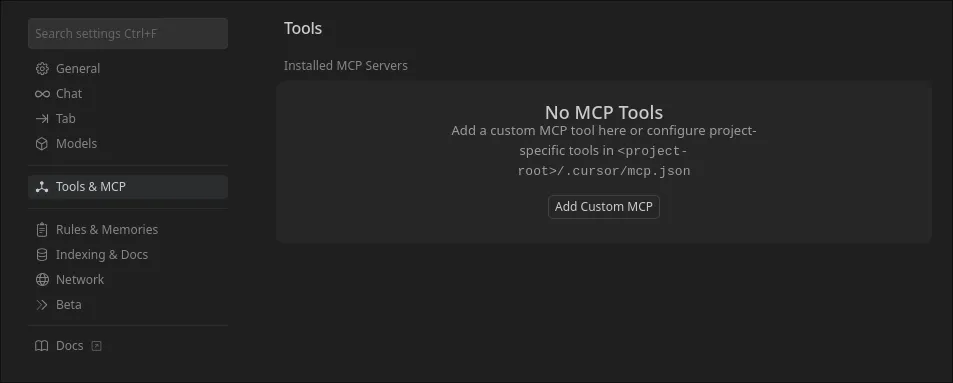
-
Open MCP Server Settings
Depending on whether you have previously added an MCP server to Cursor, either click “Add Custom MCP” or “New MCP Server” (at the bottom of the server list.)
This will open up Cursor’s
mcp.jsonsettings file. This file will either contain configuration for existing MCP servers, or an empty object like:{"mcpServers": {}}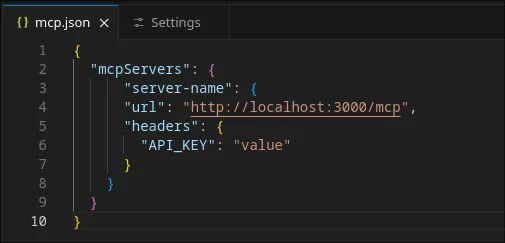
-
Add Kartograph MCP Server Configuration
To add Kartograph’s MCP server to cursor, add the following JSON object inside the existing
mcpServersobject:"kartograph": {"url": "http://localhost:8000/query/mcp","headers": {"x-github-pat": "<your-pat-here>","x-gitlab-pat": "<your-token-here>"}}The full file should look something like:
{"mcpServers": {"kartograph": {"url": "http://localhost:8000/query/mcp","headers": {"x-github-pat": "<your-pat-here>","x-gitlab-pat": "<your-token-here>"}}}} -
Save the File
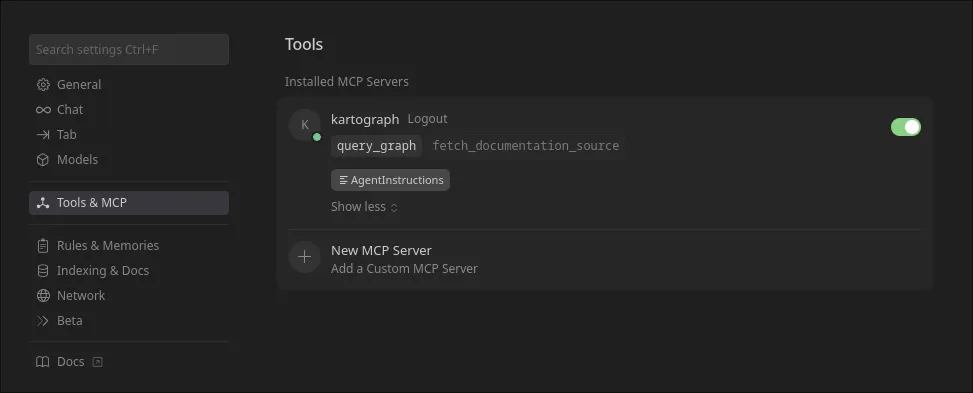
To finish adding the Kartograph MCP server to Cursor, save the
mcp.jsonand re-open Cursor Settings -> Tools & MCP.Here, you should see the Kartograph MCP server listed, as shown below.
query_graph
Section titled “query_graph”Execute read-only Cypher queries against the knowledge graph.
Parameters:
cypher(string, required) - Cypher query to executetimeout_seconds(int, default: 30, max: 60) - Query timeoutmax_rows(int, default: 1000, max: 10000) - Maximum results
Example Request:
{ "cypher": "MATCH (p:Person) RETURN p LIMIT 5", "timeout_seconds": 30, "max_rows": 100}Success Response:
{ "success": true, "rows": [ {"node": {"id": "person:abc123", "label": "Person", "properties": {"name": "Alice"}}} ], "row_count": 1, "truncated": false, "execution_time_ms": 42.5}Error Response:
{ "success": false, "error_type": "forbidden", "message": "Query must be read-only. Found forbidden keyword: CREATE"}